
Has your WordPress website been hacked, showing unwanted redirects, displaying spam content, or triggering a security warning in your browser? CVWORLD provides professional WordPress malware removal and security hardening services to help identify malicious code, eliminate infections, secure compromised websites, and safeguard your business from future cyber attacks.
We inspect WordPress core files, themes, plugins, databases, user accounts, and server environments to pinpoint every trace of compromise. After thoroughly sanitizing the website, we apply enterprise-grade security hardening measures to fortify your website against future vulnerabilities.
security-audit.terminal — WordPress Malware Investigation & Threat Quarantine
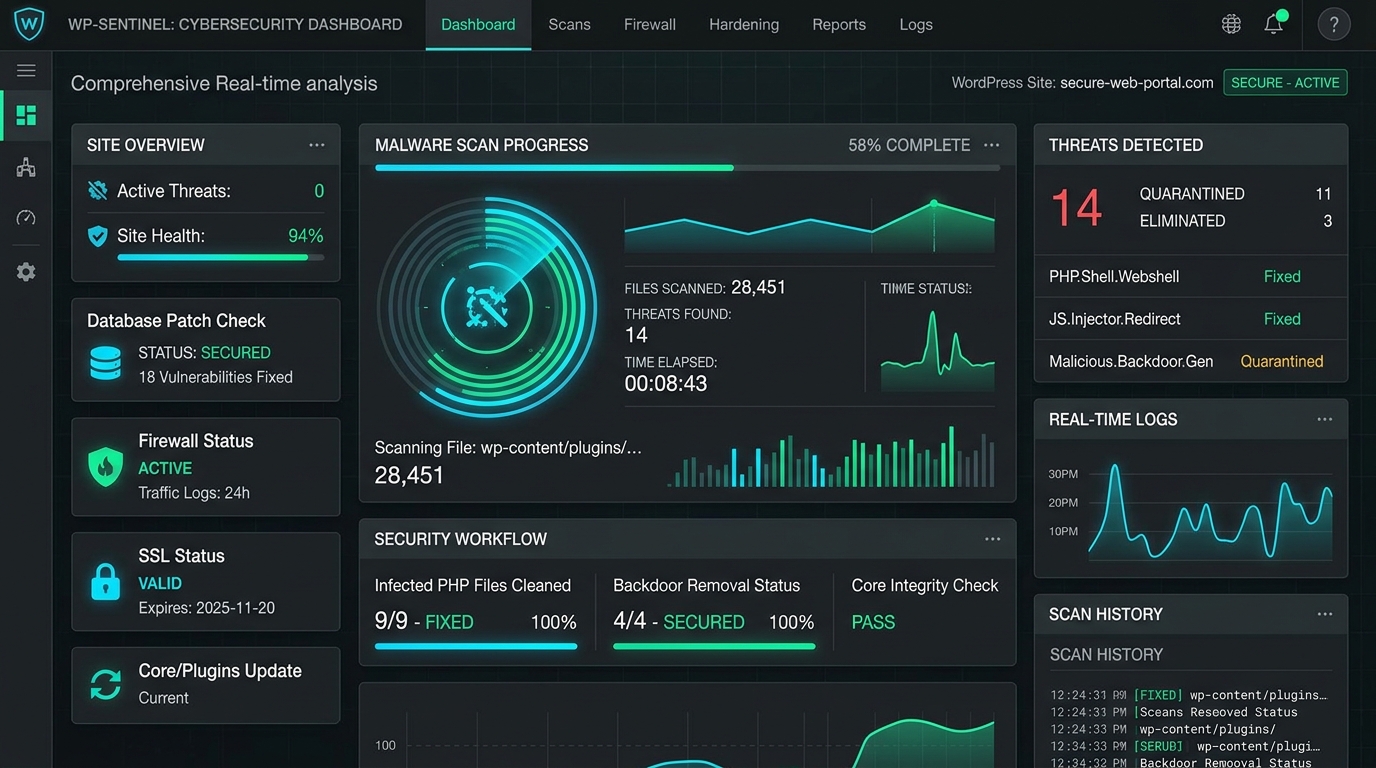
Verified Malware Removal Work Dashboard: Real-time cybersecurity diagnostic showing comprehensive file scanning, quarantine of malicious PHP webshells and redirect scripts, database vulnerability remediation, and active server firewall protection.
Is Your WordPress Website Hacked?
A compromised WordPress website does not always display an obvious defacement screen. Modern malware is engineered to operate silently in the background, harvesting visitor data or redirecting search traffic until blacklists or security scanners intervene. Common signs that your WordPress website is compromised include:
Unexpected Redirects
Visitors or mobile traffic get redirected automatically to spam, advertising, betting, or phishing websites.
Spam Pages & Injected Content
Unknown Japanese/pharmacy keyword spam, rogue landing pages, or unauthorized promotional popups appear on your domain.
Rogue Administrator Accounts
Unknown administrator users appear in your WordPress Users list, often created through privilege escalation vulnerabilities.
Suspicious Files in Directories
Unknown PHP scripts disguised as system files appear inside /wp-content/uploads/, /wp-includes/, or root.
Browser & Antivirus Warnings
Chrome, Firefox, or Safari triggers red “Deceptive site ahead” or “Dangerous Site” warnings blocking visitors.
Server Overload & Crippling Slowdowns
Host suspensions, 503 errors, high CPU spikes, and severe performance drop caused by background crypto-mining or spam mailers.
If you notice any of these symptoms, your website requires immediate expert investigation. Randomly reinstalling plugins or editing files without finding root causes often fails because stealth backdoors remain active.
Our WordPress Malware Removal Service
Our malware cleanup methodology focuses on discovering the origin, entry vectors, and full extent of compromise rather than simply wiping visible files.
Malware Scanning & Security Analysis
Deep file-by-file integrity verification against official WordPress checksums. We audit core files, themes, plugins, uploads, databases, cron jobs, and configuration files.
Malicious Code & Script Removal
Surgical extraction of obfuscated PHP payloads, eval scripts, base64 injections, and malicious JavaScript while strictly preserving your website layout, features, and content.
Backdoor Detection & Elimination
Attackers embed stealth backdoors to regain access after cleanups. We hunt down hidden webshells, rogue cron tasks, and unauthorized access tokens to permanently shut entry doors.
Malicious Redirect Removal
We trace and clean infected .htaccess rewrite directives, corrupt index files, and malicious database scripts forcing unauthorized mobile or search engine redirects.
Database Malware Sanitization
Malware frequently embeds inside wp_options, wp_posts, and user tables. We thoroughly sanitize your MySQL database, removing spam links and malicious serialized code.
Core, Theme & Plugin Audit
We replace tampered core files with authentic source packages, identify abandoned or vulnerable plugins, and apply secure compatibility updates to close exploit paths.
Google Security Warning and Blacklist Assistance
When a WordPress site is compromised, Google Safe Browsing, Norton, and security authorities immediately flag the domain with blacklists and browser warnings. We help you resolve this swiftly:
- Identifying the root cause triggering the warning
- Completely eradicating the malicious code and spam content
- Reviewing Google Search Console security alerts and diagnostics
- Preparing and submitting formal reconsideration and security review requests
- Verifying domain unblocking across major browsers and antivirus databases
WordPress Security Hardening
Removing malware is only the first step. Following official WordPress.org Security Hardening best practices, we implement layered defensive configurations that fortify your CMS against future exploits:
Login & Brute-Force Protection
Enforce login rate limiting, custom secret login URLs, and two-factor authentication (2FA) to stop automated dictionary attacks.
User Account Security
Audit administrator privileges, purge dormant accounts, enforce high-entropy passwords, and reset all security salts and keys.
File & Configuration Hardening
Lock file permissions, secure wp-config.php and .htaccess, and disable direct PHP execution inside upload directories.
XML-RPC & REST API Protection
Restrict or disable XML-RPC functionality to prevent amplification DDoS attacks and unauthorized credential brute-forcing.
Web Application Firewall (WAF)
Deploy intelligent firewall filtering to intercept malicious payloads, SQL injection queries, and known zero-day vulnerability exploits.
Continuous Security Monitoring
Automated file change detection and security activity logging to instantly catch unauthorized alterations before damage occurs.
Automated WordPress Backup Setup
A reliable backup is your ultimate safety net. As part of our security package, we establish automated offsite backup routines:
- Full website files and MySQL database backup automation
- Scheduled backup frequency (daily or weekly based on publishing volume)
- Encrypted remote cloud storage (Google Drive, AWS S3, or secure offsite FTP)
- Custom retention policies to preserve clean historical restoration points
- Disaster recovery restoration drill to guarantee rapid restore capability
Our 8-Step WordPress Malware Removal Process
Initial Website Assessment
We review reported symptoms, blacklist notices, and server logs to determine the compromise scope.
Malware & Vulnerability Scan
Deep scanning across core files, database records, uploads, and third-party code for malicious signatures.
Infection & Code Analysis
Differentiating legitimate custom functionality from injected webshells and unauthorized code additions.
Malware & Redirect Cleanup
Surgical extraction of malicious files, spam entries, database injections, and rogue admin accounts.
Vulnerability Patching
Patching outdated themes, plugins, and core files to seal the entry vectors used in the initial breach.
Security Hardening
Configuring firewall rules, login rate limiting, file execution blocks, and security key rotations.
Full Functional & Speed Testing
Rigorous testing of forms, carts, and page speeds aligned with our website speed optimization standards.
Blacklist Review Submission
Filing reconsideration requests with Google Safe Browsing and security authorities to unblock your domain.
What Is Included in Our Security Service
- Complete WordPress file and database malware scan
- WordPress core integrity review and official file restoration
- Theme and plugin security review and clean replacement
- Malicious code, obfuscated script, and PHP webshell removal
- Backdoor detection, unauthorized cron cleanup, and persistence removal
- Malicious redirect investigation and cleanup
- Suspicious file elimination across upload directories
- Unauthorized administrator account review and purge
- Database malware sanitization across all tables
- Vulnerability identification and entry point sealing
- WordPress security hardening and login protection
- Two-factor authentication (2FA) setup where appropriate
- XML-RPC restriction to block brute-force attempts
- Web Application Firewall (WAF) configuration
- Automated offsite backup setup
- Post-cleanup website testing and verification
- Assistance with Google Search Console security blacklist removal
Why WordPress Websites Get Hacked
While WordPress core is rigorously maintained by a global security team, individual sites become vulnerable due to external vectors:
- Outdated WordPress core, theme, or plugin versions
- Nulled or pirated themes and plugins downloaded from illegitimate sources
- Weak administrator usernames (e.g., “admin”) and guessable passwords
- Compromised shared hosting accounts and lack of server-level isolation
- Unmaintained or abandoned plugins with unpatched vulnerabilities
- Poor file permissions allowing arbitrary file upload and execution
- Insecure third-party API integrations and database credentials
What Happens After Malware Removal?
Cleaning a website eliminates the active compromise, but lasting protection requires active maintenance. After cleanup, we recommend:
- Applying regular WordPress core, theme, and plugin security updates
- Enforcing multi-factor authentication and high-entropy passwords
- Maintaining automated offsite backups with verified restoration points
- Continuously monitoring file changes and firewall audit logs
- Removing inactive plugins and themes to minimize attack surface
- Selecting secure, reputable hosting environments with isolated containers
Frequently Asked Questions
Common signs include unexpected redirects to foreign websites, spam promotional content appearing on your pages, unknown administrator accounts, suspicious PHP files, browser security warnings, or unexplained traffic drops in search results. A professional scan can detect stealth infections that do not show visible symptoms.
Yes. In the vast majority of cases, your original design, branding, content, and layout are 100% preserved. We clean and replace infected code rather than destroying your theme or database content.
No. Our priority is to eliminate malicious code while protecting legitimate customer data, orders, pages, and media files. We always take a full safety backup before starting any remediation work.
Yes. We identify and remove malicious redirect rules across .htaccess files, index files, theme functions, JavaScript injectors, and compromised database records.
Yes. We scan all system and upload directories for hidden webshells, base64 obfuscations, rogue cron jobs, and stealth persistence scripts to guarantee hackers cannot regain unauthorized access.
Yes. Once our cleanup is complete, we verify that all malicious payloads are eliminated and submit an official reconsideration request through Google Search Console to expedite warning removal.
Not necessarily. Simply reinstalling WordPress often leaves backdoors intact in uploads, database tables, and plugins. A comprehensive audit and targeted cleanup is far more effective than an arbitrary reinstall.
Yes. We implement enterprise security hardening, including firewall setup, brute-force defense, login URL protection, file permission lockdown, and automated backups to prevent re-infection.
Most standard infections are completely cleaned, hardened, and verified within 4 to 24 hours. Deeply compromised multi-site networks or extensive database corruptions may require additional testing.
Restore and Protect Your WordPress Website
If your WordPress website has been compromised, acting quickly limits further damage, prevents search engine penalties, and safeguards your business reputation. Contact CVWORLD today to discuss your hacked WordPress website and get an immediate assessment, cleanup, and enterprise security hardening.
What's included
- 24-Hour Emergency Malware Cleanup
- Complete WordPress Core & DB File Scan
- Backdoor & Webshell Extermination
- Malicious Redirect & Script Removal
- Google Safe Browsing & Blacklist Fix
- Enterprise Web Application Firewall (WAF)
- Brute-Force & Login URL Protection
- File Execution & wp-config Lockdown
- Automated Daily Offsite Cloud Backups
- Post-Cleanup Verification & Audit Report