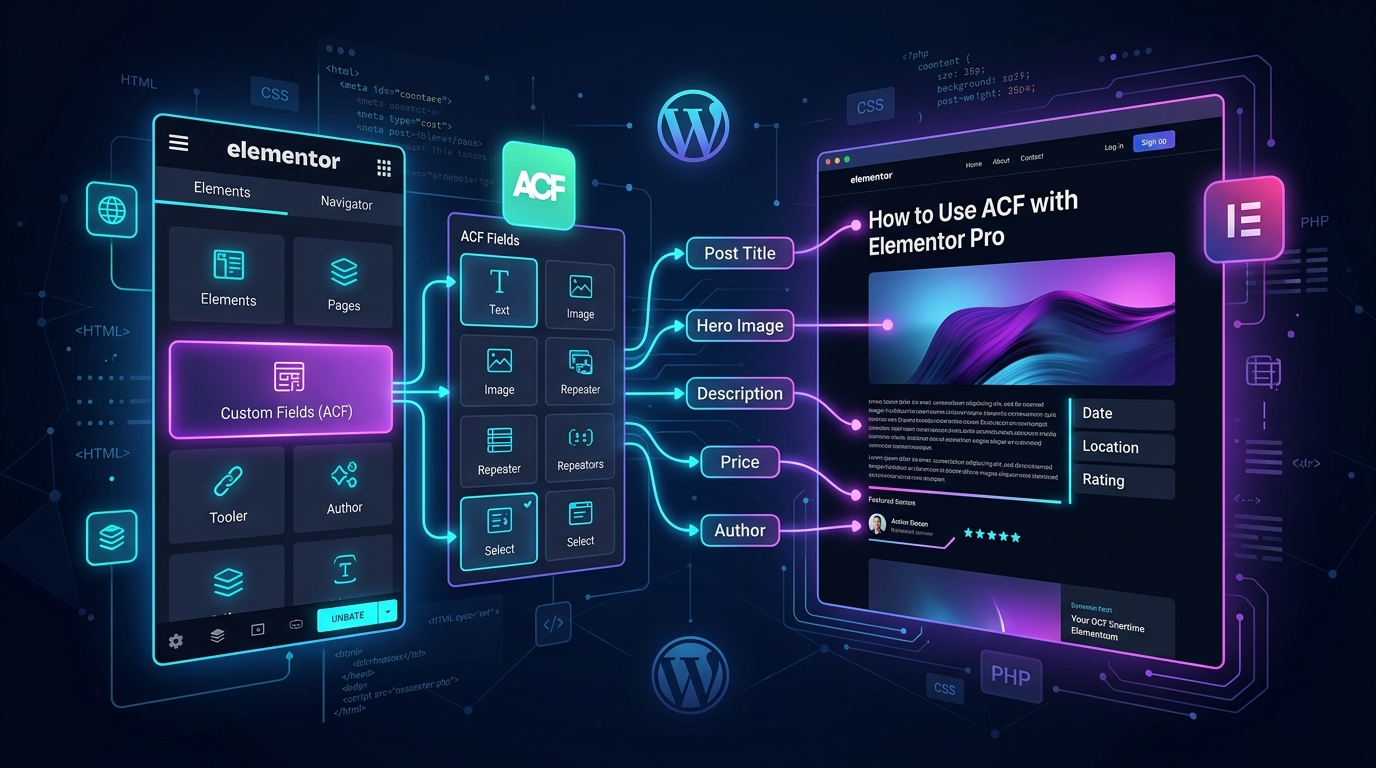
To connect ACF (Advanced Custom Fields) with Elementor Pro: (1) install ACF and create a Field Group with your required fields (Text, Image, Repeater, URL), (2) assign the Field Group to a Custom Post Type or Page, (3) create a Single Post or Archive template inside Elementor Theme Builder, (4) click the Dynamic Tags database icon next to any Elementor widget setting, (5) choose ACF Field and select your field key, and (6) configure Display Conditions to publish the template across your post type.
Key Takeaways
- ACF enables custom dynamic fields (text, image, repeater, relationship) displayed natively via Elementor Pro Dynamic Tags.
- Theme Builder templates dynamically pull custom meta without touching single PHP template files.
- Always set fallback values for dynamic fields to prevent layout shifts if fields are left blank.
- ACF Pro repeater and gallery fields pair seamlessly with Elementor Pro Loop Grids.
Building scalable, dynamic websites in WordPress requires separating design architecture from content management. When building custom real estate portals, directory listings, automotive inventories, or case studies, hardcoding every single page in Elementor is unsustainable. Combining Advanced Custom Fields (ACF) with Elementor Pro’s Dynamic Tags allows you to build a single master template that automatically renders bespoke data for thousands of individual posts.
At CV World, dynamic custom architecture is the backbone of our web development practice. In this complete developer guide, we walk you through the entire workflow of pairing ACF and Elementor Pro in 2026, including handling complex fields like Repeaters, Galleries, and relationship queries.
1. Step 1: Planning Custom Post Types (CPT) and Custom Fields
Before touching Elementor, define your data model in WordPress. Using either the free Custom Post Type UI (CPT UI) or ACF’s built-in post type manager (ACF 6.1+):
- Navigate to ACF → Post Types → Add New.
- Create a new post type, for example: Properties (Plural) and Property (Singular).
- Set supported features: Title, Editor, Featured Image, and Custom Fields.
- Click Save Changes.
2. Step 2: Creating the ACF Field Group
Now, create structured meta inputs for your content editors:
- Go to ACF → Field Groups → Add New and name it Property Specifications.
- Add your specific fields:
- Property Price: Field Type = Number / Text (Field Name:
property_price). - Square Footage: Field Type = Number (Field Name:
property_sqft). - Bedrooms / Bathrooms: Field Type = Select or Number.
- Floor Plan PDF: Field Type = File (Field Name:
floor_plan_pdf). - Virtual Tour URL: Field Type = URL or oEmbed.
- Property Price: Field Type = Number / Text (Field Name:
- In the Location Rules box, set: Show this field group if Post Type is equal to Property.
- Click Save Changes.
3. Step 3: Designing the Single Post Template in Elementor Theme Builder
With custom fields configured and populated on a test post, create your dynamic layout:
- In WordPress Admin, navigate to Templates → Theme Builder → Single Post → Add New.
- Click the Gear icon at bottom left (Settings → Preview Settings) and set Preview Dynamic Content as Property. Select your test property to view live data while designing.
- Add a Heading Widget for the property title. In the Content tab, click the Dynamic Tags database cylinder icon → select Post Title.
- Add another Heading Widget for the price:
- Click Dynamic Tags → Scroll to ACF → ACF Field.
- Click the wrench icon next to ACF Field and choose
property_pricefrom the dropdown. - In the Advanced sub-tab of the dynamic tag, add a prefix (e.g.,
$or₹) and comma formatting.
4. Advanced: Displaying ACF Image & Gallery Fields
To display an ACF Image field:
- Drag an Image Widget onto your canvas.
- Hover over the image preview box and click the Dynamic Tags icon.
- Select ACF Image Field and choose your field key (e.g.,
property_hero_photo). - Elementor automatically pulls the URL and renders it with responsive srcset attributes.
5. Dynamic Visibility and Conditional Display
Not every post will have every field filled out. Elementor Pro allows you to prevent empty containers from displaying:
- Click the Container or Widget containing the custom field.
- In the Advanced tab, configure Display Conditions (or use the built-in Hide if empty option in Dynamic Tags).
- This ensures your layout remains clean even if certain properties omit a video tour or floor plan.
6. Common ACF + Elementor Troubleshooting
| Issue | Probable Cause | Solution |
|---|---|---|
| ACF Field does not appear in dropdown | Field Group location rule not assigned to the active post type. | Check ACF Location Rules; ensure preview post is saved as published. |
| Image field renders blank | Return format set to “Image ID” instead of “Image Array” or “Image URL”. | Change ACF Image Return Format to “Image Array” in field settings. |
| Repeater fields not rendering natively | Elementor core does not loop repeaters natively without add-ons. | Use Elementor Pro Loop Grid with custom query, or install ACF Frontend / Anywhere Elementor. |
Need a custom dynamic web application, property listing engine, or directory platform built on WordPress? Check out our custom WordPress development services at CV World.
ACF Repeater & Relationship Fields: Advanced Architecture
When structuring high-end dynamic directories or portfolio projects, simple text fields are rarely enough. Managing ACF Repeater Fields (for multi-row lists such as team members or pricing feature tables) and Relationship Fields (linking articles to specific case studies) turns WordPress into a headless-grade relational database.
By coupling ACF Relationship fields with Elementor’s Loop Grid, you can build self-updating cross-reference blocks that automatically showcase products designed by a specific author or properties managed by a specific agent without manual data entry.
Frequently Asked Questions
Ready to Build Professional Websites Faster?
Supercharge your WordPress design workflow with 100+ premium widgets, theme builder capabilities, and dynamic WooCommerce templates.
The free version of ACF works perfectly with Elementor Pro for standard fields (Text, Textarea, Number, Select, Image, File). ACF Pro is only required if you need Repeater Fields, Flexible Content, or Options Pages.
No. ACF stores data in native WordPress postmeta tables with optimized query indexing. Paired with object caching (Redis) and LiteSpeed cache, dynamic pages load in under 1 second.
Yes. You can design a custom Loop Item template and insert ACF Dynamic Tags inside the card. When rendered via the Loop Grid widget, each card pulls its dynamic ACF data automatically.
Yes. Content editors only interact with clean input fields in the standard WordPress dashboard edit screen, completely shielding your Elementor layouts from accidental layout breaks.
No. When implemented using modern clean-code standards, responsive Flexbox containers, and server-side caching, your website maintains rapid sub-second loading speeds and easily passes Google Core Web Vitals assessments.
No. We build every layout using intuitive drag-and-drop visual controls and custom fields, allowing content managers to update text, replace images, and publish new pages without touching code.
We recommend managed high-speed hosting with LiteSpeed web server technology (such as Hostinger Cloud or Cloudways) with Redis object caching and automated daily backups.
Yes. Full responsive breakpoint controls allow you to adjust spacing, font sizes, column ordering, and element visibility independently for each screen size.
[
Ready to Build Something Great?
Connect with CV World lead engineers on WhatsApp for a fast, fixed quote and zero obligation.