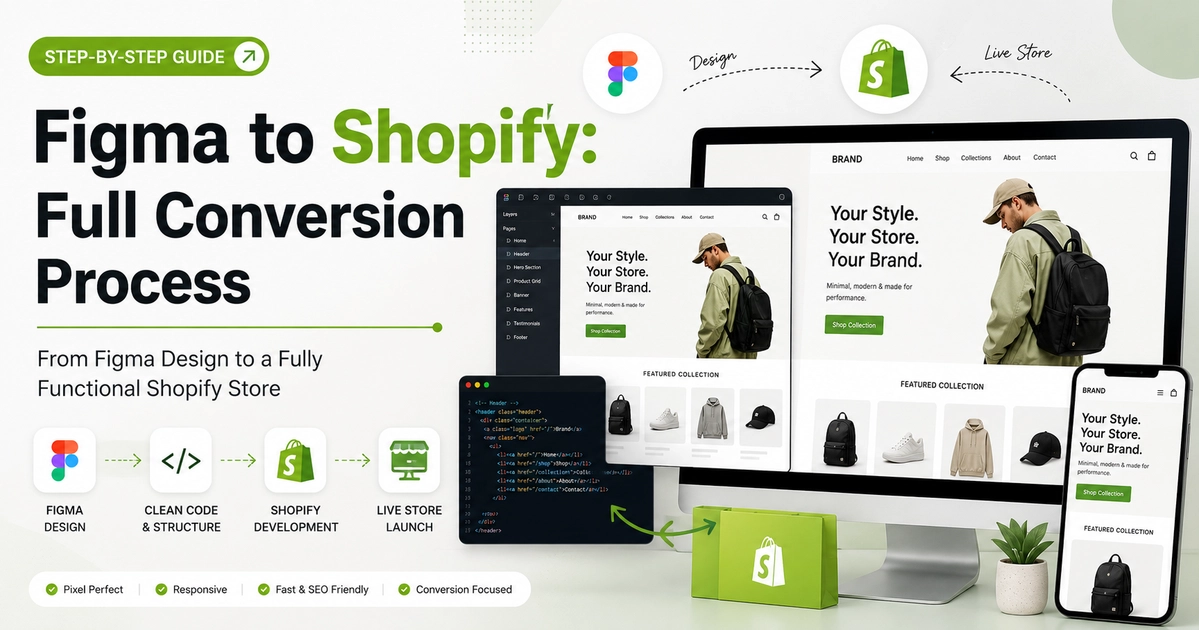
Converting a Figma design to Shopify involves five sequential development phases: (1) auditing design tokens and auto-layouts, (2) establishing a modern Shopify CLI 3.x developer environment, (3) hand-coding reusable Online Store 2.0 Liquid sections with custom settings schemas, (4) engineering AJAX cart and variant logic in Vanilla JS, and (5) running Core Web Vitals optimization before publishing live.
Key Takeaways
- Convert Figma components into modular Shopify 2.0 sections using clean Liquid and Tailwind/vanilla CSS.
- Build dynamic JSON templates allowing marketing teams to reorder blocks in theme customizer.
- Implement native lazy loading with Shopify image_url filters to achieve 90+ Core Web Vitals.
- Fix broken layout integrations by avoiding heavy external JavaScript libraries.
Figma is the industry standard for creating contemporary, conversion-optimized e-commerce experiences. Its collaborative design system, component variants, and Auto-Layout capabilities enable UX designers to craft stunning digital storefronts. However, turning a sophisticated Figma design system into a scalable, high-converting Shopify store requires bridging the gap between visual design and Shopify’s Online Store 2.0 Liquid architecture.
At CV World, our engineering team specializes in converting complex Figma UI kits into custom, lightning-fast Shopify themes. In this in-depth guide, we share our production-tested developer workflow for turning Figma files into custom Shopify stores in 2026.
1. Preparation: Auditing Design Tokens & Components
Before launching local development servers, inspect the Figma design system systematically:
- Color Variables: Map brand primary, surface card fills, badge alerts, success states, and neutral backgrounds into Shopify theme settings.
- Typography Scales: Identify web-safe Google Fonts or custom commercial WOFF2 font files. Note line heights, paragraph spacing, and responsive heading sizes.
- Component Variants: Review button states (default, hover, focused, loading, disabled), product cards, variant selectors (chips vs dropdowns), and notification toasts.
- Auto-Layout Constraints: Note horizontal spacing, padding gutters, and flex-wrap behaviors to translate them directly into CSS Flexbox and Grid rules.
2. Development Environment Setup with Shopify CLI
Professional Shopify developers build using the official Shopify CLI paired with Git version control and Theme Dawn or a minimal starter theme:
# Install Shopify CLI
npm install -g @shopify/cli @shopify/theme

# Log in to merchant development store
shopify theme dev --store your-brand.myshopify.com

# Pull base theme assets or start clean
shopify theme pull
The CLI spins up a live local development server with hot reload, allowing engineers to write Liquid, CSS, and JS with immediate visual feedback in the browser.
3. Building Online Store 2.0 (OS 2.0) Modular Sections
Modern merchants demand total independence from developers for daily marketing updates. Every major section from your Figma design must be architected as a modular, drag-and-drop section with a robust JSON schema:
{% schema %}
{
  "name": "USP Highlights",
  "tag": "section",
  "class": "section-usp-highlights",
  "settings": [
    {
      "type": "text",
      "id": "title",
      "label": "Section Title",
      "default": "Why Shop With Us"
    }
  ],
  "blocks": [
    {
      "type": "usp_item",
      "name": "USP Item",
      "settings": [
        {
          "type": "image_picker",
          "id": "icon",
          "label": "USP Icon"
        },
        {
          "type": "text",
          "id": "headline",
          "label": "Headline",
          "default": "Free Worldwide Delivery"
        },
        {
          "type": "textarea",
          "id": "subtext",
          "label": "Description"
        }
      ]
    }
  ],
  "presets": [
    {
      "name": "USP Highlights"
    }
  ]
}
{% endschema %}
4. Custom Product Detail Page (PDP) Engineering
The product page represents the highest friction point in the customer journey. We translate Figma PDP mockups into conversion engines:
- Dynamic Image Galleries: Implement fluid thumbnail carousels and pinch-to-zoom modals on mobile devices.
- Smart Variant Matching: Synchronize color swatches with SKU availability, showing real-time inventory counts and out-of-stock badges.
- Accordion Specifications & FAQs: Render collapsible tabs for materials, sizing guides, and shipping policies using semantic HTML and CSS transitions.
- Sticky Mobile Add-to-Cart Bar: Ensure users can add products to cart effortlessly as they scroll through reviews and descriptions.
5. Optimizing Core Web Vitals & Loading Speed
Variant Swatches & AJAX Inventory Integration
Converting product detail pages from Figma to Shopify requires dynamic variant handling. Rather than relying on clunky native dropdown selectors, we code custom Liquid color swatches that synchronize with Shopify’s product JSON API. When a shopper clicks a color swatch, the main product gallery instantly slides to the matching image, the URL parameters update seamlessly, and real-time inventory counts reflect stock availability with zero page refresh latency.
Shopify CLI 3.x Development Commands for Figma Conversions
# Initialize local development environment
shopify theme dev --store your-brand.myshopify.com

# Check for Liquid syntax errors and theme linting
shopify theme check

# Push custom JSON templates and sections to preview theme
shopify theme push --development

# Publish production-ready theme live to store
shopify theme publish
Using the official Shopify CLI workflow ensures full Git version control, branch isolation, and zero disruption to live customer checkout sessions during development.
Advanced Shopify 2.0 Architecture & Liquid Standards
When turning complex Figma UI components into high-converting Shopify 2.0 themes, maintaining clean code architecture is critical for long-term store scalability and maintenance:
- Modular Section Schema: Every Figma layout block should be built as an independent JSON schema section inside the
/sectionsdirectory, enabling store owners to reorder, customize, and configure blocks dynamically in the theme editor. - Native App Embed Blocks: Build dedicated block targets within sections to ensure third-party reviews, subscriptions, and cross-sell apps integrate without altering core theme files.
- Image Optimization with Liquid Filters: Always render uploaded images using Shopify’s native
image_urlfilter with explicit responsive widths (e.g., 360, 540, 720, 1080) andloading="lazy"attributes to ensure top Core Web Vitals scores. - Zero CSS Framework Bloat: Code custom CSS using modern CSS variables and flex/grid architectures rather than bulky generic frameworks that hurt initial render times.
Figma to Shopify 2.0 Component Mapping Architecture
| Figma Design Element | Shopify 2.0 Architecture | Implementation Standard |
|---|---|---|
| Auto-Layout Frame | JSON Schema Section (/sections) | CSS Flexbox / CSS Grid with responsive gap variables. |
| Reusable Component | Liquid Snippet (/snippets) | Modular, reusable Liquid partials with parameter passing. |
| Design Tokens (Colors/Fonts) | settings_schema.json | Global theme typography and color picker configurations. |
Frequently Asked Questions
A standard custom Shopify build (Homepage, Collection, Product, Cart Drawer, and informational pages) typically requires 7 to 12 business days for complete development, testing, and QA.
Yes. All sections and templates are built according to Shopify Online Store 2.0 standards, supporting App Blocks and App Embeds without theme conflicts.
Absolutely. Every section is built with intuitive settings in the Shopify visual theme customizer, enabling your marketing team to edit banners, headlines, products, and links easily.
Yes. We manage DNS configuration, SSL certificate activation, Google Search Console indexing, and payment gateway verification during store launch.
No. When implemented using modern clean-code standards, responsive Flexbox containers, and server-side caching, your website maintains rapid sub-second loading speeds and easily passes Google Core Web Vitals assessments.
Need Expert Development, Speed Optimization or Custom Migration?
Talk directly with CV World lead engineers. Get a transparent, fixed-price quote with guaranteed 90+ Core Web Vitals and zero obligation.